Dashboard Plugin
Overview
This article is aimed at InLong Dashboard plug-in developers, trying to describe the process of developing a Dashboard plug-in as comprehensively as possible, helping developers quickly add a data storage LoadNode, and making plug-in development easier. The InLong Dashboard itself acts as a front-end console, built with the React framework.
Basic
Design Summary
This is a schematic diagram of the design of the InLong Dashboard plugin. We treat the plugin as a separate level, and each page uses different plugins for consumption. Data and View are abstract classes provided by the system, and plugins are derived classes one by one.
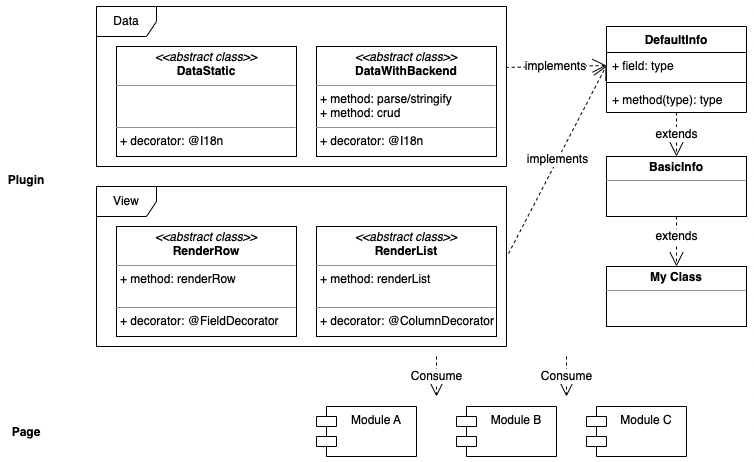
Directory Structure
|
|- defaults: default public plugins provided by the InLong community
|- extends: The extension plug-in during privatization deployment, as an internal plug-in, will not be released to the community
|- common: the common design of the plugin, e.g. the design of `BasicInfo`
Data Class
We provide two basic data classes, and each plugin can only implement one of them to implement the data model. At the same time, in the basic data class, a @I18n is provided, which can be used to describe the field.
- DataStatic static data class
- DataWithBackend communicates with the backend data class
View Class
On the view, we provide two basic view classes, each plugin can implement one or more of them to implement the view model.
- RenderRow, in which
@FieldDecoratoris provided to describe the row data view - RenderList, in which
@ColumnDecoratoris provided to describe the column data view
Example
Below is a basic example, in the plugin, a class that communicates with backend is implemented, containing 3 fields (username, password, format). Among them, BasicInfo comes from their different base type classes.
import { DataWithBackend } from '@/metas/DataWithBackend';
import { RenderRow } from '@/metas/RenderRow';
import { RenderList } from '@/metas/RenderList';
import { BasicInfo } from '../common/BasicInfo';

const { I18n } = DataWithBackend;
const { FieldDecorator } = RenderRow;
const { ColumnDecorator } = RenderList;

export default class Example extends BasicInfo implements DataWithBackend, RenderRow, RenderList {
  @FieldDecorator({
    type: 'input',
    rules: [{ required: true }],
  })
  @I18n('meta.Sinks.Username')
  username: string;

  @FieldDecorator({
    type: 'password',
    rules: [{ required: true }],
  })
  @I18n('meta.Sinks.Password')
  password: string;

  @FieldDecorator({
    type: 'radio',
    initialValue: 'TextFile',
    rules: [{ required: true }],
    props: {
      options: [
        {
          label: 'TextFile',
          value: 'TextFile',
        },
        {
          label: 'SequenceFile',
          value: 'SequenceFile',
        },
      ],
    },
  })
  @I18n('meta.Sinks.Example.Format')
  format: string;
}
Extend ExtractNode
In the inlong-dashboard/src/metas/sources/defaults directory, create a new Example.ts file as a new plugin, and export it in the index.ts file in the current directory (refer to Existing writing method), which completes a new ExtractNode named Example.
Extend LoadNode
In the inlong-dashboard/src/metas/sinks/defaults directory, create a new Example.ts file as a new plugin, and export it in the index.ts file in the current directory (refer to The existing writing method), which completes a new LoadNode named Example.